

This collaboration marks a significant step towards providing you with a seamless and secure banking environment. Here's why you should be as excited as we are about this launch and how you can get started:
Benefits of Using Google Pay with SweepBank
Convenience
With Google Pay integrated into the SweepBank app, there is no need to juggle multiple apps to manage your finances. You can now conduct transactions directly from the SweepBank app with just a few taps.
Security
Google Pay uses advanced encryption and security protocols to protect your data. This means that your transactions are not only fast but also secure, giving you peace of mind with every transaction you make.
Speed
Bid farewell to the lengthy process of entering card details or banking credentials every time. With Google Pay, transactions are quicker than ever, saving you valuable time so that you can focus on what matters most.
Setting Up Google Pay in the SweepBank App
Embarking on this seamless and secure journey is as simple as following a few steps. Here's how you can set up Google Pay within your SweepBank app:
- Download Google Wallet: Before you get started, ensure that you have the Google Wallet app installed on your mobile device. If you don't have it already, download it from the Google Play Store.
- Update Your App: Ensure your SweepBank app is up-to-date to enjoy this new feature.
To add your SweepBank Credit Card to Google Pay:
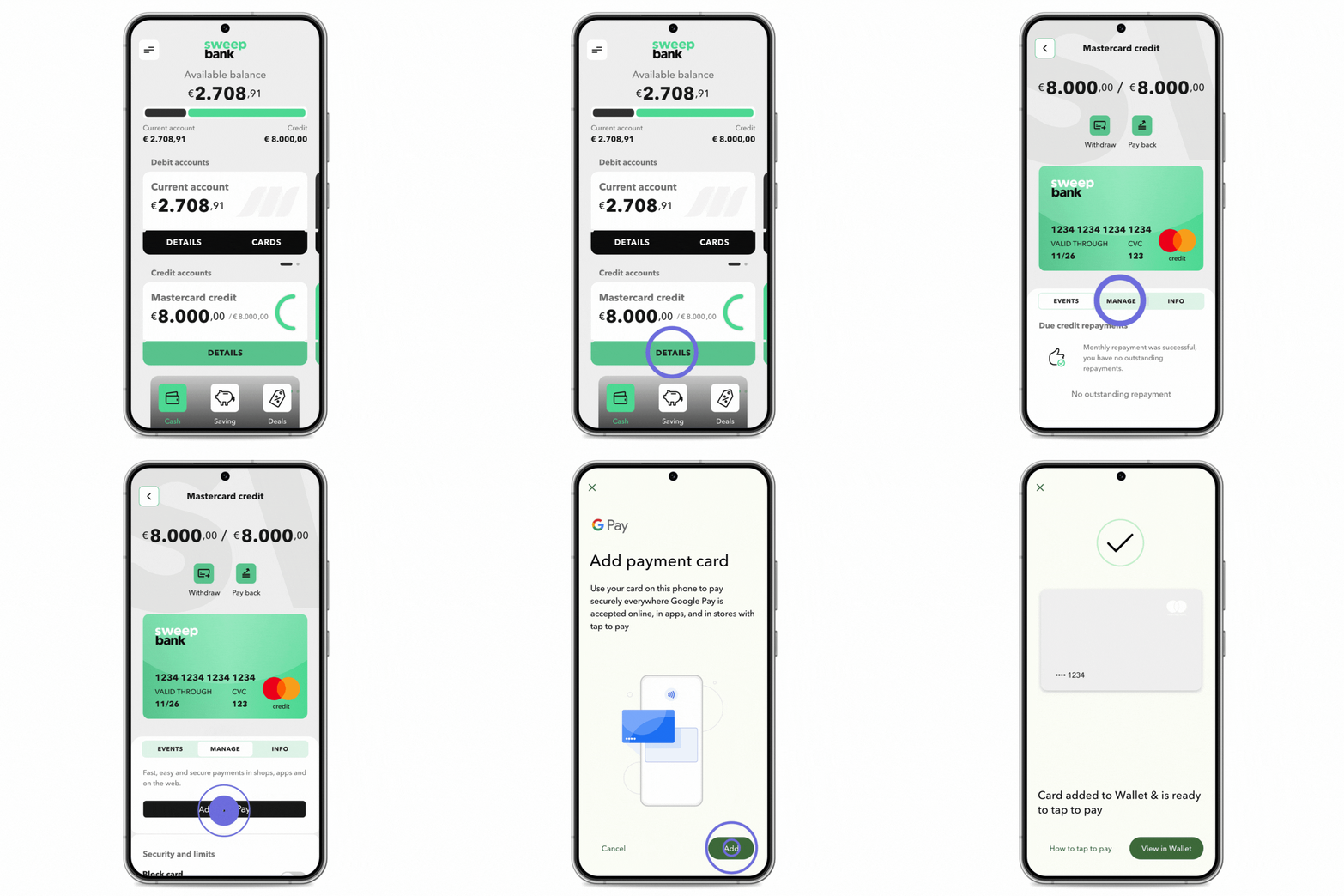
- Click Details on the Mastercard credit tile on the SweepBank app home screen
- Click the Manage tab
- Click Add to Google Pay
- Follow the on-screen instructions
To add your SweepBank Debit Card to Google Pay:
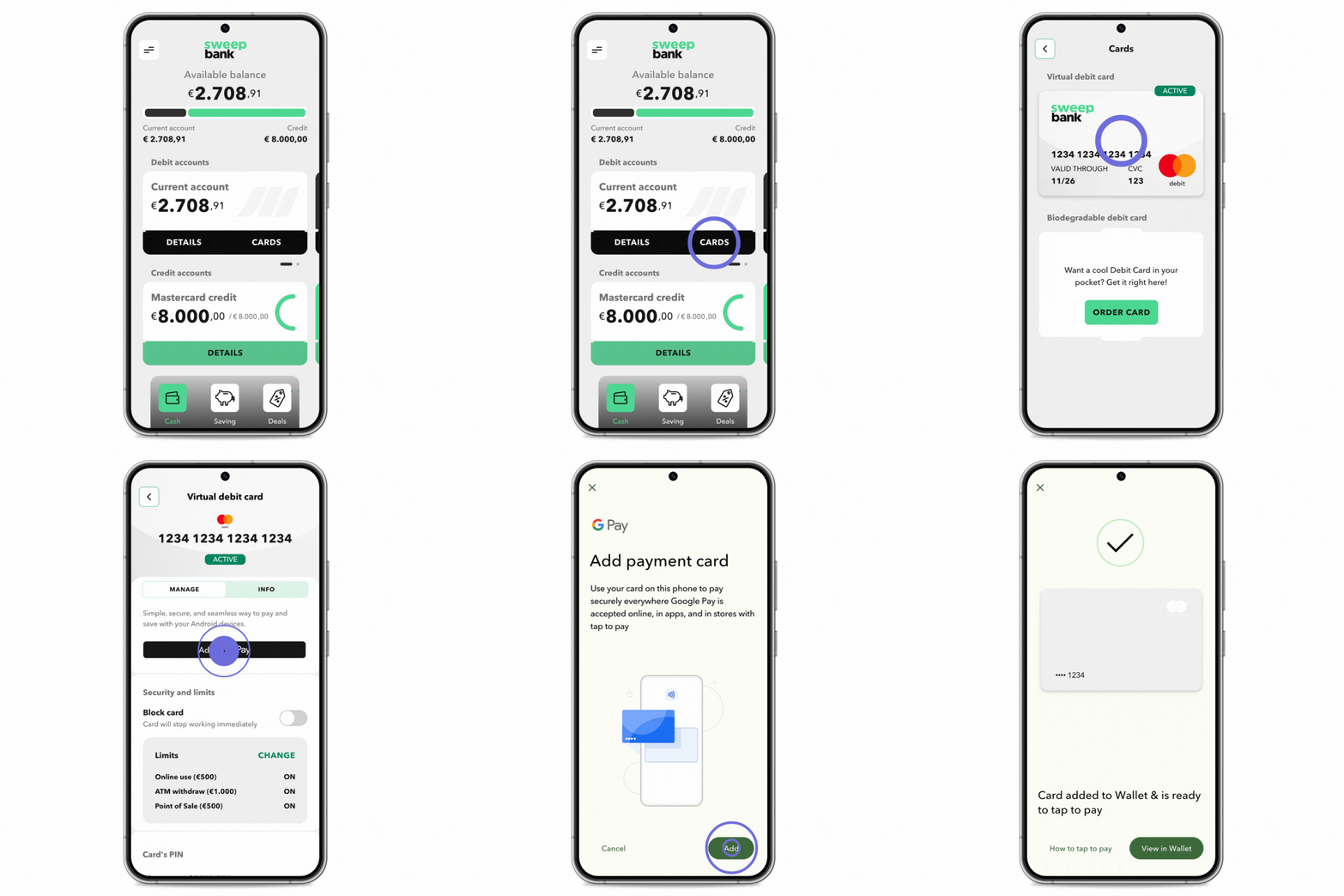
- Click Cards on the Current Account tile on the SweepBank app home screen
- Click on your Active virtual debit card
- Click Add to Google Pay
- Follow the on-screen instructions
Look for the notification prompt confirming your card has been successfully added to Google Pay.
Tips for Using Google Pay with SweepBank
Seamless Transactions
Utilize the SweepBank app to make seamless transactions with the convenience of using either your virtual Credit Card or virtual Debit Card. Setting up and using both card options in Google Pay simplifies transactions, making them more streamlined than ever.
Utilize Your Virtual Cards
With Google Pay integration, you have the flexibility to use both your virtual Credit Card and virtual Debit Card from SweepBank for transactions. This not only enhances security but also provides you with multiple options for managing your finances effectively.
Enjoy Exclusive Rewards
Keep an eye out for exclusive rewards and bonuses that you can earn by using Google Pay for transactions through the SweepBank app. Maximize your benefits by using both your virtual Credit Card and virtual Debit Card for different transactions.
Activate Google Pay today
Ready to dive into a new enhanced banking experience? Update your SweepBank app now and set up Google Pay to enjoy a world of convenience at your fingertips. If you have any questions or need assistance, feel free to visit the SweepBank Help Center for more assistance.
Make the switch today. Happy Banking!